
Imagine waking up every morning to a perfectly timed routine that sets your day just right—without lifting a finger. You can make this happen with Alexa by scheduling routines that fit your lifestyle.
Whether it’s turning on the lights, playing your favorite music, or getting the news brief, setting up these automated actions can save you time and make your home smarter. Ready to take control and simplify your daily tasks? Keep reading, and you’ll learn exactly how to schedule routines in Alexa step by step. Schedule Routines in Alexa
Benefits Of Alexa Routines
Alexa routines let you automate tasks with a simple command. They combine multiple actions into one.
You can schedule routines to run at specific times or trigger by voice. This helps make life easier.
Save Time And Effort
Scheduling routines saves time by doing many tasks at once. You do not need to repeat commands.
Routines can turn off lights, adjust temperature, and play music automatically. This reduces manual work.
- Automate daily tasks
- Skip repetitive commands
- Focus on important things
Enhance Home Automation
Alexa routines connect many smart devices together. They create smooth and smart home experiences.
You can control lights, plugs, cameras, and more with one routine. This makes your home smarter.
- Link multiple smart devices
- Control your home easily
- Create custom scenes and moods
Boost Daily Productivity
Routines help plan your day by setting reminders and alerts. This keeps you on schedule.
You can start routines to get news, weather, and traffic updates. This helps you prepare fast.
- Set morning and evening routines
- Get quick updates
- Stay organized all day
Setting Up Alexa Routines
Alexa routines help automate tasks by linking actions to triggers. You can control smart devices or get updates automatically.
Setting up routines is easy with the Alexa app. Follow these steps to create and customize your routines.
Accessing The Alexa App
Open the Alexa app on your smartphone or tablet. Make sure you are signed in with your Amazon account.
The app works on both iOS and Android devices. You can download it from the App Store or Google Play if needed.
Creating A New Routine
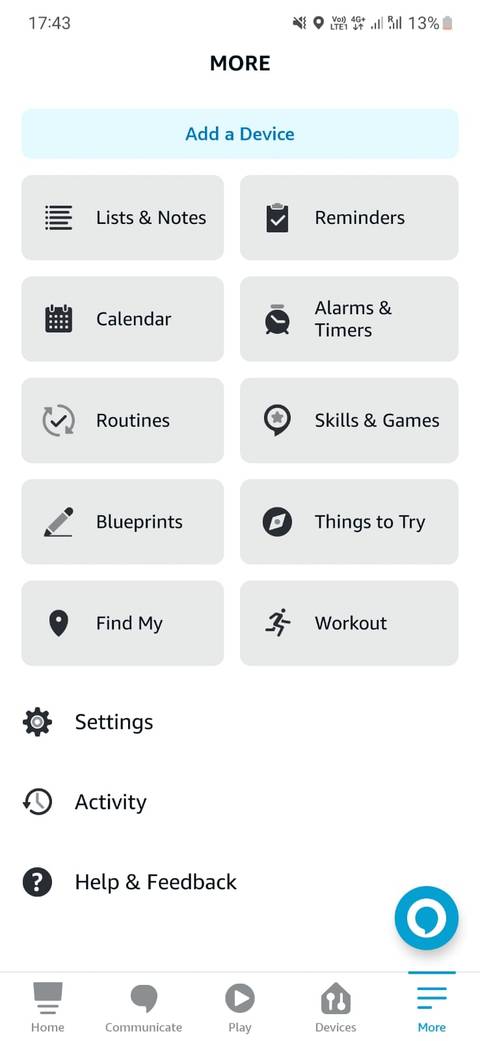
In the Alexa app, tap the “More” menu at the bottom. Then select “Routines” to view existing routines.
Tap the plus (+) icon to create a new routine. This starts the setup process for your custom routine.
Choosing Routine Triggers
Triggers tell Alexa when to start your routine. You can pick from many options like time, voice commands, or device detection.
- Schedule: Set a specific time or day
- Voice: Use a custom phrase to start
- Device: Trigger when a smart device changes
- Location: Start when you arrive or leave
Choose the trigger that fits your needs best. You can add more than one trigger if you want.
Adding Actions
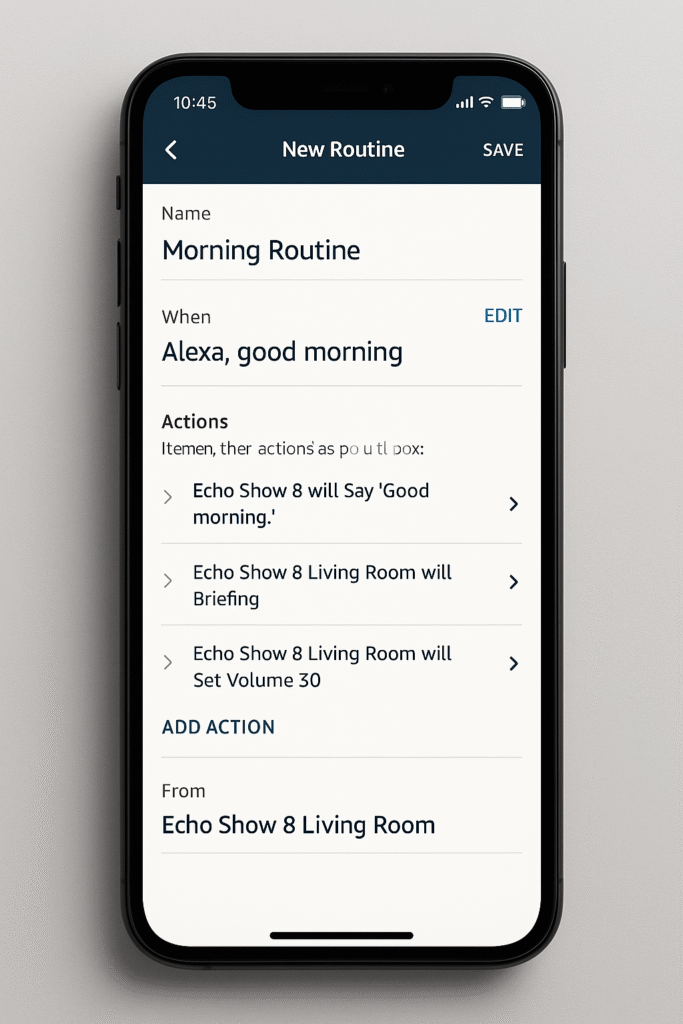
Actions are what Alexa does after the trigger starts the routine. You can add many actions to a single routine. Schedule Routines in Alexa
- Control smart home devices like lights or plugs
- Play music, news, or weather updates
- Send notifications to your phone
- Read calendar events or reminders
After adding actions, save your routine. Alexa will perform these actions automatically based on your triggers.
Customizing Routine Triggers
Scheduling routines in Alexa lets you automate tasks easily. You can set different triggers to start your routines.
Customizing triggers helps you control when and how Alexa acts. This makes routines fit your daily life. Schedule Routines in Alexa
Voice Commands
You can start a routine by saying a specific phrase to Alexa. This lets you control routines with your voice.
Choose simple commands that are easy to remember. Make sure Alexa understands your voice clearly.
- Say “Alexa, start my morning routine”
- Use custom phrases for different routines
- Test commands to ensure they work well
Scheduled Times
You can set routines to run at specific times. This helps automate daily tasks without needing your voice.
Pick the days and exact times for routines to start. This keeps your schedule consistent.
- Set routines for morning, afternoon, or night
- Choose specific days like weekdays or weekends
- Adjust times easily in the Alexa app
Device Activity
Routines can start based on what your Alexa devices detect. This means routines react to your actions automatically. Schedule Routines in Alexa
Use device activity like turning on lights or connecting to Wi-Fi to trigger routines. This adds smart control to your home.
- Start a routine when a smart light turns on
- Trigger routines when a device connects to Wi-Fi
- Use motion detection from compatible devices
Location-based Triggers
You can make routines start when you arrive or leave a place. Alexa uses your phone’s location for this.
Set up routines to help at home or work. This makes your smart home respond to where you are. Schedule Routines in Alexa
- Run routines when you leave your house
- Start tasks when you get to work
- Customize locations in the Alexa app

Credit: www.reddit.com
Popular Routine Ideas
Scheduling routines in Alexa helps you automate daily tasks. It saves time and makes life easier.
You can create routines for morning, evening, work, or leaving home. These routines improve your daily flow.
Morning Wake-up Routine
Start your day with a routine that wakes you up gently. Alexa can turn on lights and play soft music.
This routine can also give you the weather and news updates. It helps you prepare for the day ahead.
- Turn on bedroom lights
- Play relaxing music or alarms
- Give weather and news brief
- Read your calendar events
Evening Wind-down Routine
Use an evening routine to relax before bed. Alexa can dim lights and play calm sounds.
This routine can remind you to prepare for tomorrow and turn off devices. It helps you sleep better.
- Dim or turn off lights
- Play white noise or soft music
- Remind about tomorrow’s tasks
- Turn off smart plugs or devices
Workday Start Routine
Create a routine to start your workday smoothly. Alexa can adjust lights and set reminders. Schedule Routines in Alexa
This routine can also open your calendar and play focus music. It helps you get ready for work.
- Turn on office or desk lights
- Give calendar and meeting alerts
- Play focus or instrumental music
- Set reminders for tasks
Leaving Home Routine
Set a routine for when you leave home. Alexa can turn off lights and lock doors if smart locks are connected.
This routine can also adjust the thermostat and send you reminders. It helps keep your home safe and efficient.
- Turn off all lights
- Lock smart locks
- Adjust thermostat settings
- Send reminders for keys or wallet
Managing And Editing Routines
Scheduling routines in Alexa helps automate daily tasks. Managing these routines keeps your smart home running smoothly.
You can change, remove, or organize routines anytime in the Alexa app. This guide explains how to manage your routines easily.
Modifying Existing Routines
To change a routine, open the Alexa app and go to the Routines section. Select the routine you want to edit.
You can update the trigger, actions, or time settings. Save your changes to apply them immediately.
- Change when the routine starts
- Add or remove actions
- Adjust device settings
- Rename the routine for clarity
Deleting Routines
If a routine is no longer needed, you can delete it from the Alexa app. This helps keep your list clean.
Find the routine, tap on it, and choose the delete option. Confirm to remove it permanently.
- Open the Alexa app
- Go to Routines
- Select the routine to delete
- Tap Delete and confirm
Organizing Multiple Routines
When you have many routines, organizing them helps you find and manage them fast. Use clear names and categories.
Sort routines by time, type, or purpose. Group similar routines together for easy access.
- Use descriptive names for routines
- Group routines by room or task
- Delete routines you no longer use
- Review routines regularly to update them
Credit: www.androidpolice.com
Troubleshooting Common Issues
Scheduling routines in Alexa can make your day easier. Sometimes, routines may not work as expected. Knowing how to fix common problems helps you use Alexa better. Schedule Routines in Alexa
This guide covers common issues and simple fixes. You will learn what to check if your routine does not trigger, Alexa misunderstands commands, or you face connectivity problems.
Routine Not Triggering
Routines may not start at the set time or after a command. This can happen due to errors in setup or conflicts with other routines.
Check if the routine is enabled and the time is correct. Make sure the trigger type matches what you want, such as a voice command or scheduled time. Schedule Routines in Alexa
- Ensure the routine is turned on in the Alexa app
- Verify the scheduled time and days are set correctly
- Check if any other routine uses the same trigger
- Restart the Alexa device to refresh settings
Alexa Misunderstanding Commands
Alexa might not recognize your routine commands properly. This can happen if the command is unclear or the microphone has trouble hearing you.
Speak clearly and use the exact words you set in the routine trigger. You can also retrain Alexa to understand your voice better.
- Use simple and clear phrases for routine commands
- Check that the microphone is not muted
- Train Alexa with your voice profile in the app
- Repeat commands slowly if Alexa does not respond Schedule Routines in Alexa
Connectivity Problems
Alexa routines need a strong internet connection to work. Poor Wi-Fi or network issues can stop routines from running.
Check your Wi-Fi signal and router status. Restart your router and Alexa device to fix connection problems.
- Make sure Alexa is connected to your Wi-Fi network
- Restart your Wi-Fi router and Alexa device
- Move Alexa closer to the router for a better signal
- Check your internet speed and reset if it is slow
Advanced Tips And Tricks
Scheduling routines in Alexa can save time and make your day smoother. Using some advanced features helps you get more out of Alexa.
Below are tips on using third-party skills, smart home devices, and combining actions in your routines.
Using Third-party Skills
Alexa supports many third-party skills that add new features to routines. You can use these skills to control apps or get special responses.
Enable the skill first, then add it to your routine as an action. This adds variety and power to your scheduled tasks.
- Use fitness skills to start workouts automatically
- Add meditation or relaxation skills for quiet time
- Include news or weather skills for daily updates
Integrating Smart Home Devices
Alexa works well with many smart home devices. Scheduling routines can help control lights, thermostats, and more without extra effort.
Connect your smart devices to Alexa, then add commands to your routine. This makes your home more automated and comfortable.
- Turn lights on or off at set times
- Adjust thermostat for morning or night
- Control smart plugs to power devices
Combining Multiple Actions
Routines can include several actions in one schedule. This lets Alexa perform many tasks together smoothly. Schedule Routines in Alexa
Mix voice responses, smart device control, and skill actions. This makes your routine more useful and efficient.
- Turn on lights and play music at wake-up time
- Set thermostat and read news in the morning
- Switch off devices and lock doors at night
Credit: easysmarthomeguide.com
Frequently Asked Questions
How Do I Create A Routine In Alexa?
To create a routine, open the Alexa app, tap “More,” select “Routines,” then “Create Routine. ” Add a trigger and actions. Save to activate your personalized routine.
Can I Schedule Routines For Specific Times?
Yes, Alexa routines can be scheduled for specific times or days. Use the “When this happens” option and select “Schedule” to set your preferred time and frequency.
How To Add Multiple Actions In One Routine?
Within a routine, tap “Add action” multiple times to include various commands. Actions will execute in order when the routine triggers, enhancing your Alexa experience.
Is It Possible To Edit Or Delete Alexa Routines?
Yes, you can easily edit or delete routines anytime. Open the Alexa app, go to “Routines,” select the routine, then choose “Edit” or “Delete” as needed.
Conclusion
Scheduling routines in Alexa enhances daily life. It’s easy and efficient. With simple steps, you can automate tasks. This saves time and boosts productivity. Alexa responds to your needs, making life smoother. Set reminders, control devices, or play music effortlessly.
Explore possibilities and tailor routines to fit your lifestyle. Experiment with different schedules and find what works best. Enjoy the convenience Alexa brings into your home. A smart assistant that adapts to you. Embrace technology and simplify your routines. Now, get started and enjoy the benefits!
22 min read