
Imagine walking into your home with the perfect lighting greeting you every time. No more fumbling for switches or worrying if you left the lights on when you stepped out.
You can make this a reality by learning how to automate your home lights. It’s easier than you think, and it saves you time, energy, and money. Keep reading, and you’ll discover simple steps to transform your living space into a smart, comfortable haven that reacts to your needs automatically.
Ready to take control of your lighting like never before? Let’s dive in.
Benefits Of Automating Home Lights
Automating home lights means using smart devices to control your lights. You can turn lights on or off without moving.
This technology makes your home smarter and improves how you live every day.
Energy Efficiency
Automated lights help save electricity by turning off when not needed. This lowers your energy bills.
Smart systems can adjust brightness based on daylight, using less power.
- Lights turn off automatically in empty rooms
- Use dimmers to reduce power use
- Schedule lights to match your daily routine
Enhanced Security
Automated lighting can make your home safer by deterring burglars. Lights can turn on when you are away.
Some systems mimic your normal light use to show the house is occupied.
- Lights switch on at sunset automatically
- Random light patterns simulate daily activity
- Control lights remotely for quick responses
Convenience And Comfort
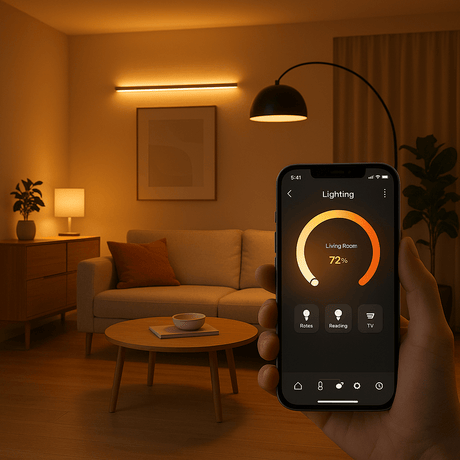
You can control lights with your phone or voice commands. This makes daily life easier.
Automated lights adjust to your needs, creating a cozy atmosphere anytime.
- Turn lights on before you enter a room
- Set different moods with color and brightness
- Use timers to match your schedule
Choosing The Right Smart Lighting System
Automating your home lights makes life easier and saves energy. Choosing the right system is key to a smooth setup.
Smart lighting systems come in many types. Knowing the differences helps you pick what fits your home best.
Types Of Smart Bulbs
Smart bulbs are easy to install. They fit into regular sockets and connect to Wi-Fi or hubs.
Some smart bulbs change colors, while others adjust brightness. Choose bulbs based on your needs.
- White bulbs: simple on/off and dimming functions
- Color bulbs: change colors and moods
- Specialty bulbs: designed for outdoor or decorative use
Smart Switches Vs Smart Bulbs
Smart switches control your lights from the wall or app. They work with regular bulbs.
Smart bulbs replace your old bulbs. They offer more features but need smart bulbs in each socket.
- Smart switches: control all bulbs on one switch
- Smart bulbs: control each bulb separately
- Smart switches work with existing bulbs
- Smart bulbs need compatible sockets
Compatibility With Home Devices
Smart lighting should work with your phone, voice assistants, or smart hubs. Check device compatibility first.
Some systems use Wi-Fi, others need a hub. Pick one that matches your current smart home setup.
- Wi-Fi bulbs connect directly to your router
- Hub-based bulbs need a separate device
- Check if your voice assistant supports the system
- Look for apps that are easy to use
Essential Tools And Devices
Automating your home lights makes life easier and saves energy. You need specific tools and devices to get started.
These tools connect your lights to smart technology. They allow control from phones or voice commands.
Smart Hubs And Controllers
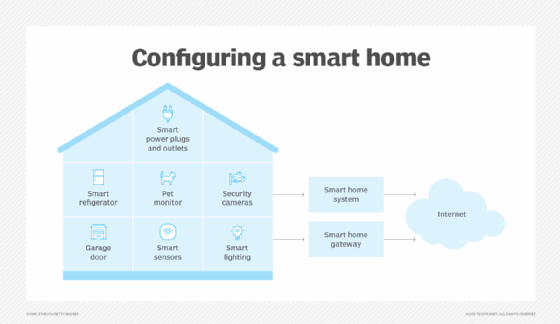
Smart hubs act as a central control point for your lights. They connect different devices in your home.
Controllers let you manage lights manually or set schedules. Many hubs support apps for easy control.
- Smart hubs link bulbs, switches, and sensors
- Controllers can be wall switches or remote devices
- Apps allow light control from anywhere
Voice Assistants Integration
Voice assistants like Alexa or Google Assistant help you control lights hands-free. They listen to your commands.
Integrating these assistants with your lights adds convenience. You can turn lights on or off by voice.
- Connect voice assistants to your smart hub
- Use simple voice commands for lighting
- Set routines and timers with voice control
Sensors And Timers
Sensors detect movement or light levels to control your lights automatically. Timers switch lights on or off at set times.
Using sensors and timers saves energy. They make sure lights are only on when needed.
- Motion sensors turn lights on when you enter a room
- Light sensors adjust brightness based on daylight
- Timers schedule lights to save energy
Credit: www.vesternet.com
Step-by-step Setup Process
Automating your home lights makes life easier and more comfortable. This guide will help you set up smart lighting in simple steps.
Follow these instructions to install smart bulbs or switches, connect them to your network, and create lighting schedules.
Installing Smart Bulbs Or Switches
Start by choosing either smart bulbs or smart switches for your home lighting. Smart bulbs replace regular bulbs, while switches control existing lights.
Turn off power before installation to stay safe. Then, screw in smart bulbs or replace switches as needed.
- Turn off power at the circuit breaker
- Remove old bulbs or switches carefully
- Install smart bulbs by screwing them into sockets
- Install smart switches by following the included wiring guide
- Turn power back on after installation
Connecting To Wi-fi And Apps
Smart lights need a Wi-Fi connection to work remotely. Use the app that comes with your bulbs or switches to connect them to your home network.
Open the app, create an account if needed, and follow the on-screen instructions to add your devices.
- Download the smart light app from your app store
- Sign up or log in to the app
- Make sure your phone is on the same Wi-Fi as your lights
- Add new devices by following app prompts
- Confirm lights are connected and responding
Configuring Scenes And Schedules
Use the app to create scenes that match your mood or activities. Scenes let you set brightness and color for one or more lights.
Schedules turn lights on or off at specific times automatically. This saves energy and adds convenience.
- Open the app and go to the scene or schedule section
- Create a new scene with your preferred light settings
- Save scenes for easy access later
- Set schedules for lights to turn on/off at chosen times
- Adjust settings anytime through the app
Customizing Automation Features
Automating your home lights makes life easier and safer. You can set lights to turn on and off without touching a switch.
Customizing these automation features helps fit your daily routines. You can choose how and when your lights react to different triggers.
Using Motion Sensors
Motion sensors detect movement in a room or area. They can automatically turn lights on when you enter and off when no one is there.
You can adjust the sensor’s sensitivity and time delay. This lets you control how long the lights stay on after movement stops.
- Set motion detection zones for specific rooms
- Adjust light-on time after no movement
- Combine with daylight sensors to save energy
Setting Geofencing Rules
Geofencing uses your phone’s location to control lights. Lights can turn on when you arrive home and off when you leave.
You can set rules based on distance or time of day. This makes sure your home is lit only when needed.
- Create arrival and departure triggers for lights
- Set different rules for day and night
- Use multiple family members’ devices for accuracy
Integrating With Other Smart Devices
Smart lights work well with other devices like speakers and thermostats. Integration lets you create scenes and routines.
You can sync lights with alarms or voice assistants. This adds convenience and a better smart home experience.
- Link lights to smart speakers for voice control
- Set lights to change when alarms go off
- Combine with smart plugs for full room automation

Credit: www.youtube.com
Troubleshooting Common Issues
Automating home lights makes life easier, but sometimes problems occur. This guide helps you fix common issues quickly.
Check these tips to solve problems with connectivity, app settings, and hardware.
Connectivity Problems
Lights often fail to connect to Wi-Fi or the smart hub. Weak signals cause many issues.
Try moving your router closer to the lights. Restart your router and smart hub to refresh connections.
- Check if Wi-Fi is working on other devices
- Use the correct network name and password
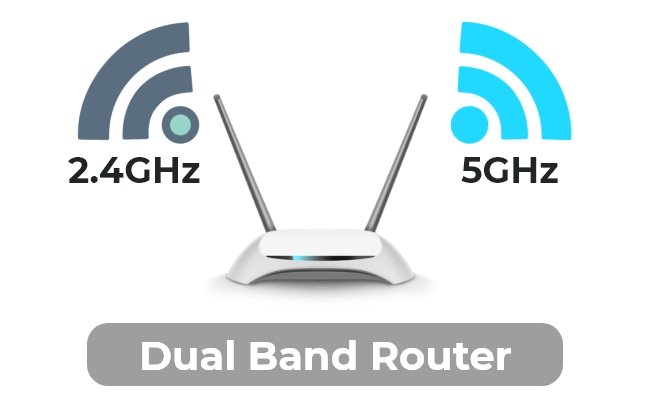
- Make sure the lights support your Wi-Fi band (2.4 GHz or 5 GHz)
- Restart the smart hub or bridge
App Configuration Errors
Incorrect app settings can stop your lights from responding. Double-check all settings carefully.
Update the app to the latest version. Remove and add the lights again if they do not appear in the app.
- Make sure the app is connected to the right account
- Verify permissions for the app to control your lights
- Reset app settings if you see unusual behavior
- Check if the app and the lights are on the same network
Hardware Malfunctions
Sometimes the lights or devices have physical faults. Check for damage or loose wiring.
Replace batteries if your devices use them. Test lights with a regular switch to see if they work.
- Inspect bulbs for cracks or dark spots
- Make sure bulbs are screwed in tightly
- Reset the smart light by turning it off and on several times
- Try different bulbs to find if one is faulty
Tips For Maximizing Smart Lighting
Smart lighting can make your home more comfortable and efficient. Using automation helps control lights easily.
With the right tips, you can save energy, improve safety, and set the perfect mood with your lights.
Energy Saving Strategies
Smart lights use less energy than regular bulbs. Automate them to turn off when not needed.
Set schedules or use motion sensors to control lighting only when someone is in the room.
- Use timers to switch lights off at night
- Install dimmers to reduce brightness and save power
- Choose LED bulbs for low energy use
- Use natural light sensors to adjust brightness
Security Enhancements
Automated lights can help protect your home. They make it look like someone is inside.
Use smart lights to turn on and off at different times. This can scare away intruders.
- Set lights to turn on when motion is detected outside
- Use remote control to switch lights on when away
- Link lights with security cameras for alerts
- Schedule lights to follow your daily routine
Creating Ambiance With Lighting
Smart lighting lets you change colors and brightness to fit your mood. It helps create a cozy home.
You can set scenes for reading, relaxing, or parties. Use your phone or voice to adjust lights easily.
- Choose warm light for relaxing evenings
- Use bright, cool light for work or study
- Set color-changing bulbs for fun events
- Program lights to change with the time of day
Credit: www.techtarget.com
Frequently Asked Questions
What Are The Best Devices To Automate Home Lights?
Smart bulbs, smart switches, and smart plugs are top devices. They connect to Wi-Fi or hubs for easy control. Choose based on compatibility with your existing lighting and smart home system.
How Do I Control Automated Lights Remotely?
Use smartphone apps provided by the smart lighting brand. These apps connect via Wi-Fi or hubs, allowing you to turn lights on or off from anywhere. Voice assistants also enable remote control through voice commands.
Can I Automate Home Lights Without Rewiring?
Yes, smart bulbs and smart plugs require no rewiring. They simply replace existing bulbs or plug into outlets. Smart switches might need minimal wiring but are usually easy to install with basic tools.
Are Automated Home Lights Energy Efficient?
Automated lights save energy by scheduling and motion detection. You can turn off lights when not needed, reducing electricity use. Many smart bulbs are LED, which use less power than traditional bulbs.
Conclusion
Automating home lights can simplify your daily routine. It’s not just convenient. It’s efficient. Start with smart bulbs or plugs. Connect them to a compatible app. Control lights from your phone or voice assistant. Set schedules to save energy. Create cozy moods with different light settings.
Easy installation makes it accessible for everyone. Smart lighting adapts to your lifestyle. Enjoy comfort and savings with automated lighting. Explore options that suit your needs and budget. Take the first step today. Transform your home lighting experience.
20 min read